
How to market a new app: launch plan, ASO and your first 1,000 users
A good app does not market itself. Here is a step-by-step app marketing strategy for a new launch, from choosing one audience and value proposition to pre-launch waitlists, app store optimization, launch week, small paid tests, onboarding and retention, and the metrics that tell you what is working.
Short answer
To market a new app, define one audience and one core value proposition, then build a waitlist landing page, analytics and a beta before launch. Optimize your store listing, run a focused launch week through communities, creators and email, test paid ads in small amounts, and measure activation and day 1, 7 and 30 retention.
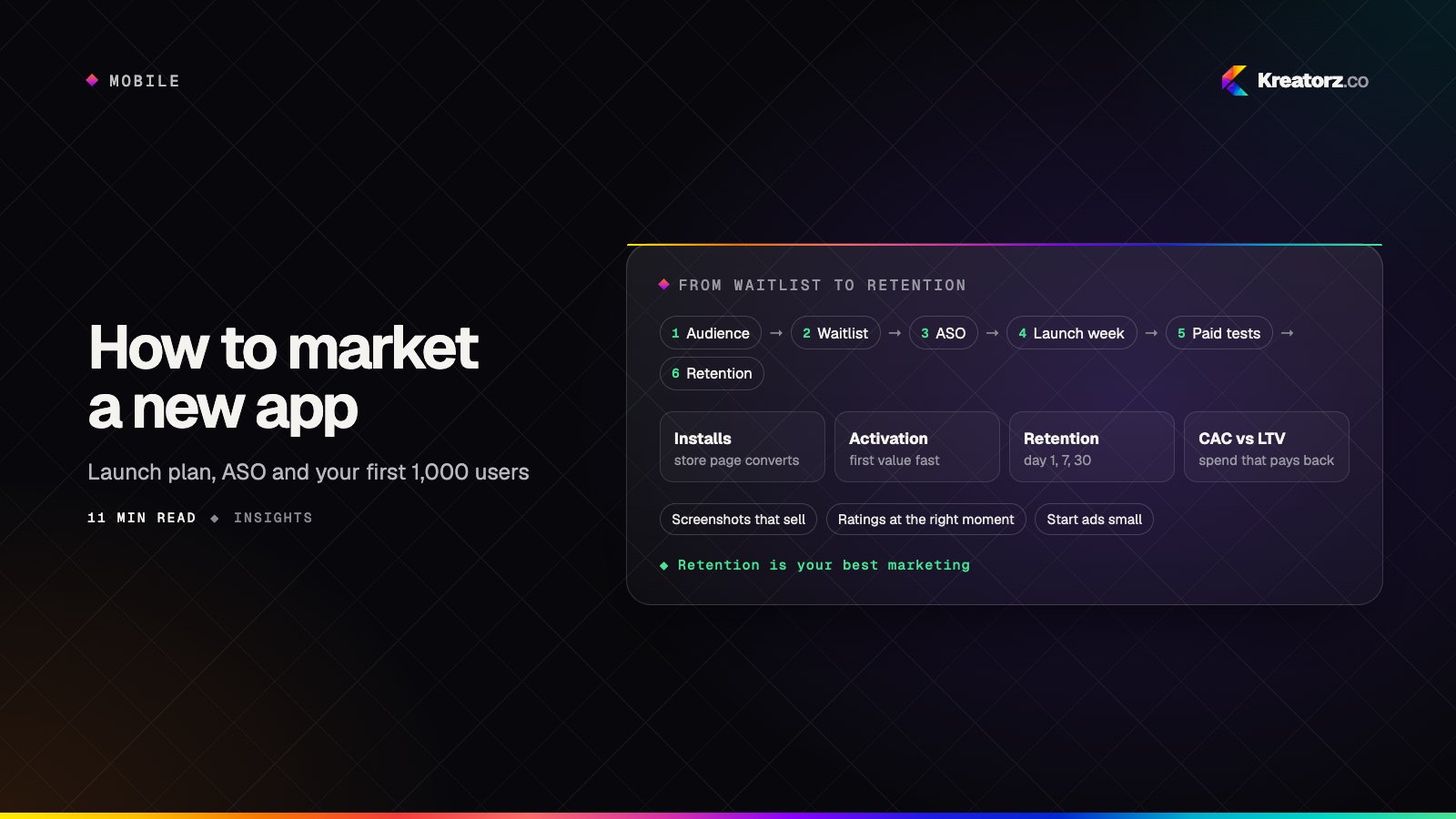
Shipping an app to the stores is the start of the work, not the end. The stores are crowded, and new apps rarely get discovered by accident. Plan marketing alongside the build: who the app is for, how they will find it and what makes them stay.
This guide walks through how to market an app step by step, from positioning and pre-launch preparation to app store optimization, launch week, paid acquisition and retention. "Your first 1,000 users" is a useful goal to plan around, not a promise.
If you still need to publish your app, start with our guide on how to launch an app on the App Store and Google Play, which covers developer accounts, review and release.
Step 1: Define one audience and one core value proposition
Most app marketing problems start before any marketing happens. If you cannot say in one sentence who the app is for and what it does better for them, no channel will fix it.
- Pick a primary audience. Not "everyone who wants to be healthier," but "new runners training for their first 5K." A narrow audience tells you where to find people and what words they use.
- Write one core value proposition. One clear outcome the app delivers, in your users' language. For example: "Plan a week of family meals in five minutes." Everything else is a supporting feature.
- Know the alternatives. List what your audience uses today, including spreadsheets, notes apps, a competitor or doing nothing. Your messaging should explain why switching is worth it.
- Talk to real people. Conversations with likely users sharpen your wording. Their exact phrases often become your keywords and headlines.
Step 2: Prepare before launch
The weeks before release are when you build the audience and tools you will need on launch day.
Build a landing page with a waitlist
Create a simple website for the app with a clear headline, a short explanation, a few screenshots or a short video, and a waitlist signup. Collect email addresses (with clear consent) so you can tell people the moment the app is live.
Set up analytics and attribution
Decide what you will measure before anyone installs. At minimum:
- Product analytics with events for key moments: signup, completing onboarding, the first core action and returning sessions. Firebase and Google Analytics 4 are common choices.
- Store analytics in App Store Connect and Google Play Console, which show impressions, product page views and installs by source.
- Attribution so you can tell which channel brought each user. Use tagged links (UTM parameters) on your website and campaign links, and consider a mobile measurement partner if you plan to run paid ads across several networks.
- Privacy and consent. On iOS, tracking across other companies' apps and websites requires permission through App Tracking Transparency. Respect consent choices on the web too, and make sure your privacy disclosures match what your analytics actually collect.
Recruit beta testers
Use TestFlight for iOS and Google Play's internal, closed and open testing tracks for Android to get the app onto real phones early. Invite people from your waitlist and the communities you plan to launch in. Testers find bugs and tell you whether the value proposition lands.
Step 3: Optimize your app store listing
Most downloads start in the store, so app store optimization (ASO) is the foundation of mobile app marketing. ASO has two jobs: being found for the right searches and convincing the people who land on your page to install.
- Keyword research. List the terms your audience searches for, judge how relevant and competitive each one is, and map the best ones to the fields each store indexes. On the App Store that means the app name, subtitle and keyword field; on Google Play, the title, short description and full description.
- Title and subtitle. Lead with your brand name and a clear description of what the app does. Write for people first; keyword stuffing reads badly and can break store guidelines.
- Screenshots. Many visitors only look at the first two or three, so use them to show the core value, not a tour of settings. Add short captions that state the benefit.
- Preview video. A short video showing the app in use can help people understand it quickly. Keep the first few seconds strong, since autoplay is often muted.
- Ratings prompts at the right moment. Use the official in-app review APIs on both platforms and ask after a moment of success, such as finishing a workout or completing a booking, never during onboarding or right after an error. Reply to reviews, especially critical ones.
- Localization. If you target several markets, translate and adapt your listing, keywords and screenshots for each one, including right-to-left languages where relevant. See our app localization services.
- Custom product pages and store listing experiments. Apple's custom product pages and product page optimization, and Google Play's custom store listings and store listing experiments, let you test variations and match a page to a specific campaign or audience.
ASO is not a one-time task. Revisit keywords and creative after launch as you learn which searches bring users who stay. If you want help, our app store optimization service covers research, listings, creative and testing for both stores.
Step 4: Plan your launch week
Launch week is about concentrating attention. Plan it day by day instead of hoping momentum appears on its own.
- Email your waitlist first. These are the people who already asked to hear from you. Send a short, clear message with direct store links on launch day, and a follow-up a few days later.
- Show up in communities. Share the app in the forums, subreddits, Discord servers, Slack groups and Facebook groups where your audience already gathers. Follow each community's rules and lead with the problem you solve, not a pitch.
- Product Hunt, where relevant. Product Hunt suits productivity, developer, AI and design tools aimed at early adopters. It is a poor fit for many consumer niches. If you use it, prepare your page, visuals and a clear first comment in advance, and be present to answer questions all day.
- Press and creators. Pitch a few writers, newsletters, podcasts and creators who cover your category. Keep pitches personal and offer early access and a short demo video.
Keep the team ready to respond. Fast, friendly replies to bug reports, reviews and questions build trust.
Step 5: Learn paid acquisition basics
Paid ads can speed up growth, but only once you know the app keeps people.
The main channels for app install campaigns are:
| Channel | Where ads appear | Good for |
|---|---|---|
| Apple Search Ads | App Store search results and other App Store placements | Capturing people actively searching for apps like yours, and testing keywords |
| Google App campaigns | Google Search, Google Play, YouTube, Discover and partner apps | Reaching Android and cross-platform users with automated targeting |
| Meta app ads | Facebook, Instagram, Messenger and Audience Network | Reaching interest-based audiences with visual creative |
How to start:
- Start small. Set modest daily budgets and run short tests before scaling anything.
- Measure cost per install and cost per retained user. Installs are easy to buy. What matters is how much it costs to get someone who completes the core action and comes back.
- Send ads to matching pages. Use custom product pages or custom store listings so the store page continues the message of the ad.
- Optimize for in-app events once you have enough data, rather than for installs alone.
If you want a team to plan and run campaigns with tracking built to match, see our digital marketing agency services.
Step 6: Use content and SEO for your app's website
Your app's website is a marketing channel in its own right. People search Google and ask AI assistants for solutions to problems long before they search an app store.
- Make the homepage clear. State what the app does, who it is for and how to get it, with store badges and smart app banners so mobile visitors can install in one tap.
- Write helpful content around the problems your audience searches for: guides, how-to articles and comparisons. Each piece should naturally point to the app as a way to solve the problem.
- Create feature and use-case pages that match specific searches, such as a page for each main use case.
Content builds slowly but keeps working after launch week. Our SEO and AEO services cover search and AI answer visibility for app websites.
Step 7: Treat onboarding and retention as marketing
Every user you keep is cheaper than a new one you have to find, and retained users write reviews, recommend the app and lift your store standing. Retention is marketing.
- Focus on activation. Define the moment a new user first gets real value, such as creating a first plan or sending a first message, and shorten the path to it. Remove optional steps, delay account creation where you can and use sensible defaults.
- Ask for push notification permission with context. Explain the benefit first and ask when it makes sense, not on the first screen. Send notifications that are useful and personal, let users control them, and respect the choice of people who say no.
- Build referral loops. Make sharing natural: invite a partner or teammate, share a result, or give both people a benefit when a friend joins. Referrals work best when the app is better with other people in it.
If your onboarding or retention needs product changes, a team that builds apps can make them directly. See our mobile app development services.
Step 8: Measure what matters
Downloads alone can be misleading. Track the full funnel so you can see where people drop off and which channels bring users who stay.
| Metric | What it tells you | Where to find it |
|---|---|---|
| Store impressions and page views | Whether people are finding your listing | App Store Connect, Google Play Console |
| Store conversion rate | Whether your listing persuades visitors to install | App Store Connect, Google Play Console |
| Installs by source | Which channels are bringing people in | Store consoles, attribution tool |
| Activation | Whether new users reach the first moment of value | Product analytics |
| Day 1 retention | Whether the first session was worth returning for | Product analytics |
| Day 7 retention | Whether the app fits into a user's week | Product analytics |
| Day 30 retention | Whether the app has become a habit | Product analytics |
| Customer acquisition cost (CAC) | What you spend to acquire a user, by channel | Ad platforms plus attribution |
| Lifetime value (LTV) | How much revenue a user brings over time | Subscription, payment or ad revenue data |
The relationship between CAC and LTV decides whether paid growth is sustainable. If a user costs more to acquire than they are worth, improve retention and monetization before you increase spend. Compare cohorts by week and channel rather than overall averages.
A 30-day app launch plan checklist
Use this as a starting point and adjust it to your app and audience.
| When | What to do |
|---|---|
| Days 1–5 (pre-launch) | Confirm audience and value proposition; publish landing page with waitlist; set up analytics, store consoles and attribution |
| Days 6–10 (pre-launch) | Run beta on TestFlight and Google Play testing tracks; fix the biggest issues; gather testimonials |
| Days 11–14 (pre-launch) | Finalize store keywords, title, subtitle, screenshots and preview video; prepare launch emails, community posts and press pitches |
| Days 15–21 (launch week) | Release; email the waitlist; post in communities; launch on Product Hunt if relevant; contact creators and press; reply to every review and question |
| Days 22–26 (post-launch) | Review activation and day 1 and day 7 retention; fix onboarding drop-offs; start small paid tests on one or two channels |
| Days 27–30 (post-launch) | Compare channels on cost per retained user; update ASO based on real search data; publish your first content pieces; plan the next 30 days |
How Kreatorz helps with app marketing
Kreatorz is a software and app development company with offices in Sheridan, Wyoming (USA), Brantford, Ontario and Lahore, Pakistan. One senior team builds iOS and Android apps and runs app store optimization and marketing, so when a campaign or store test uncovers a problem in onboarding, tracking or performance, the same people can fix it in the product.
If you are planning a launch or your app is live but not growing, tell us about your app and we will suggest a clear next step.
Frequently asked questions
How do I market a new app with no budget?
Start with the channels that cost time rather than money: a waitlist landing page, app store optimization, communities where your audience gathers, outreach to creators and newsletters, and helpful content on your website.
When should I start marketing my app?
Start before launch. Define your audience and value proposition early, publish a landing page with a waitlist and recruit beta testers several weeks before release. That way people are ready to install and share the app on launch day.
What is app store optimization and why does it matter?
App store optimization (ASO) is improving how your app is found and chosen in the App Store and Google Play. It covers keywords, the title and subtitle, screenshots, preview video, ratings and localization.
How do I get my first users for an app?
Begin with people you can reach directly: your waitlist, beta testers, personal network and online communities where your audience already spends time. Add a focused launch week, creator and press outreach, and small paid tests once you know the app keeps users.
What metrics should I track after launching an app?
Track the full funnel: store page views and conversion, installs by source, activation, and day 1, day 7 and day 30 retention. For paid growth, compare customer acquisition cost with lifetime value by channel, and look at cohorts over time rather than overall averages.
- App store optimization (ASO)Kreatorz provides app store optimization services for the Apple App Store and Google Play.Explore
- Digital marketing agencyWe plan and run SEO, answer engine optimization, app store optimization, branding, content, social media and paid campaigns — and because we also build websites, apps…Explore
- Mobile app developmentWe plan, design, build and grow mobile apps for iPhone and Android — choosing the right technology for your product, not the one we happen to prefer.Explore


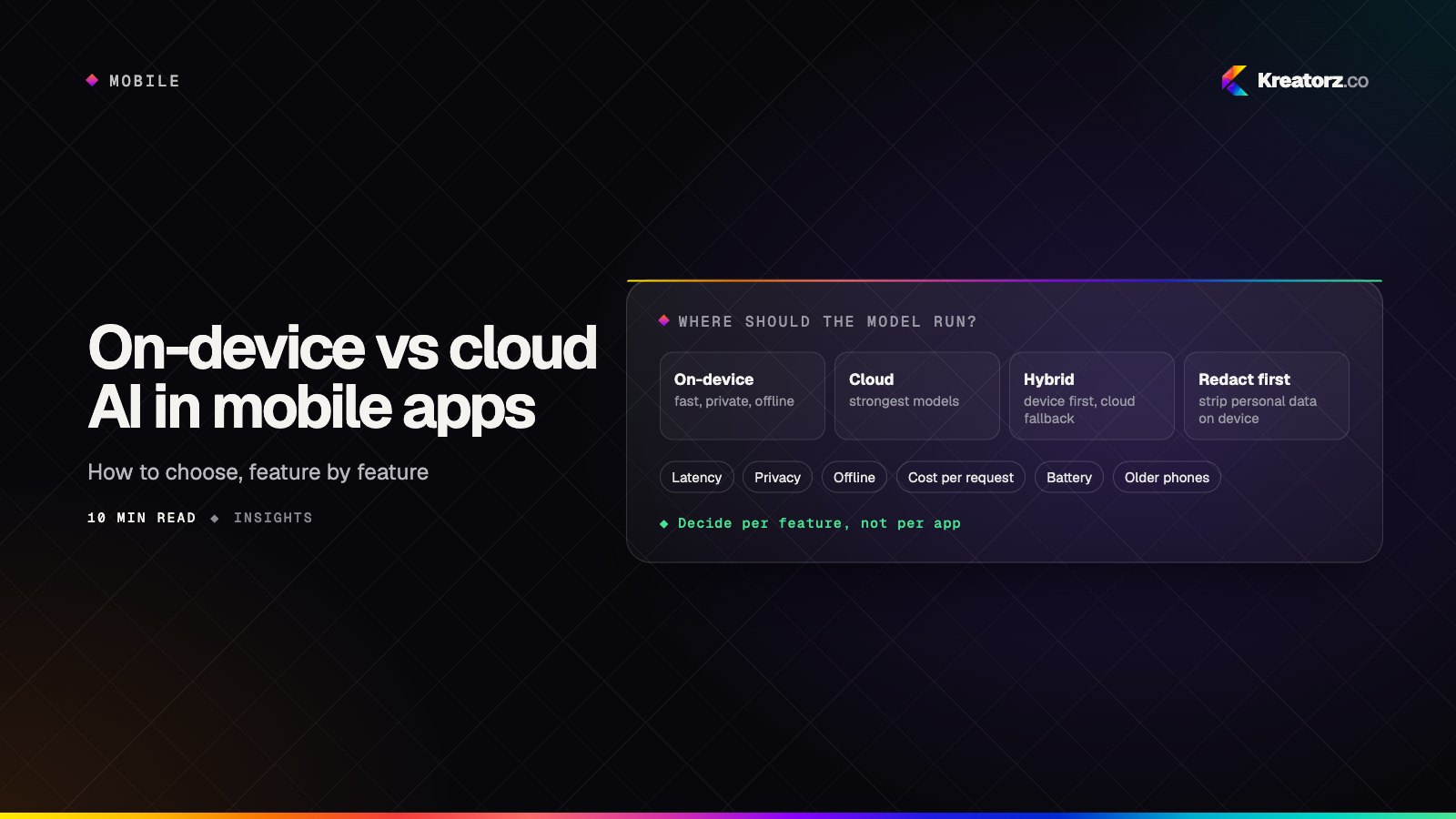
On-device vs cloud vs hybrid AI in mobile apps: how to choose
Phones can now run capable small models, and both Apple and Google offer on-device AI frameworks. That does not make the cloud obsolete. Here is a step-by-step guide to deciding, feature by feature, where the AI in your mobile app should run.
19 November 2026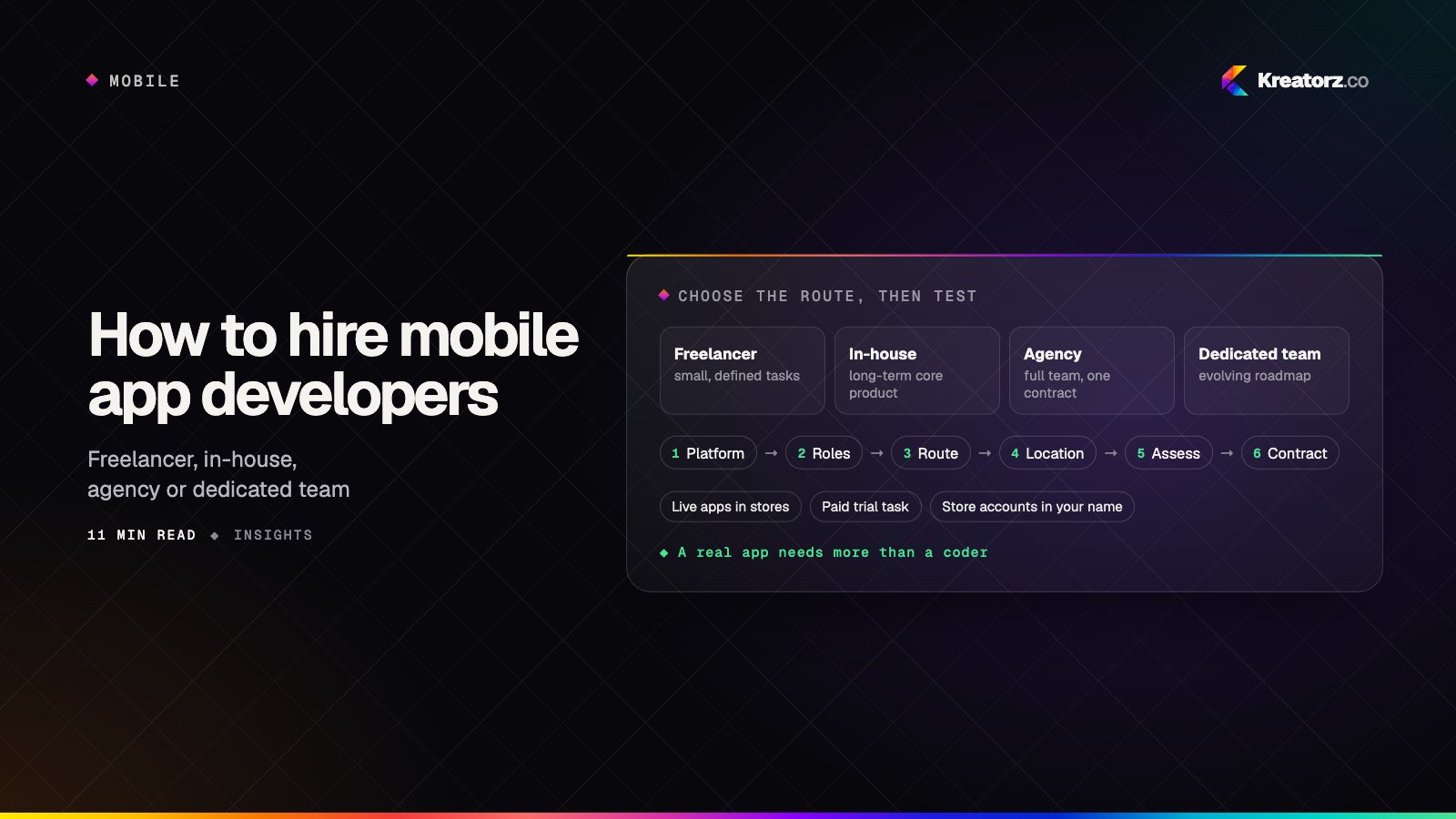
How to hire mobile app developers: a step-by-step guide
Hiring mobile app developers is about more than finding someone who can code. Here is a practical, step-by-step process for choosing between freelancers, in-house hires, agencies and dedicated teams, assessing developers properly, and protecting your app, code and store accounts.
18 November 2026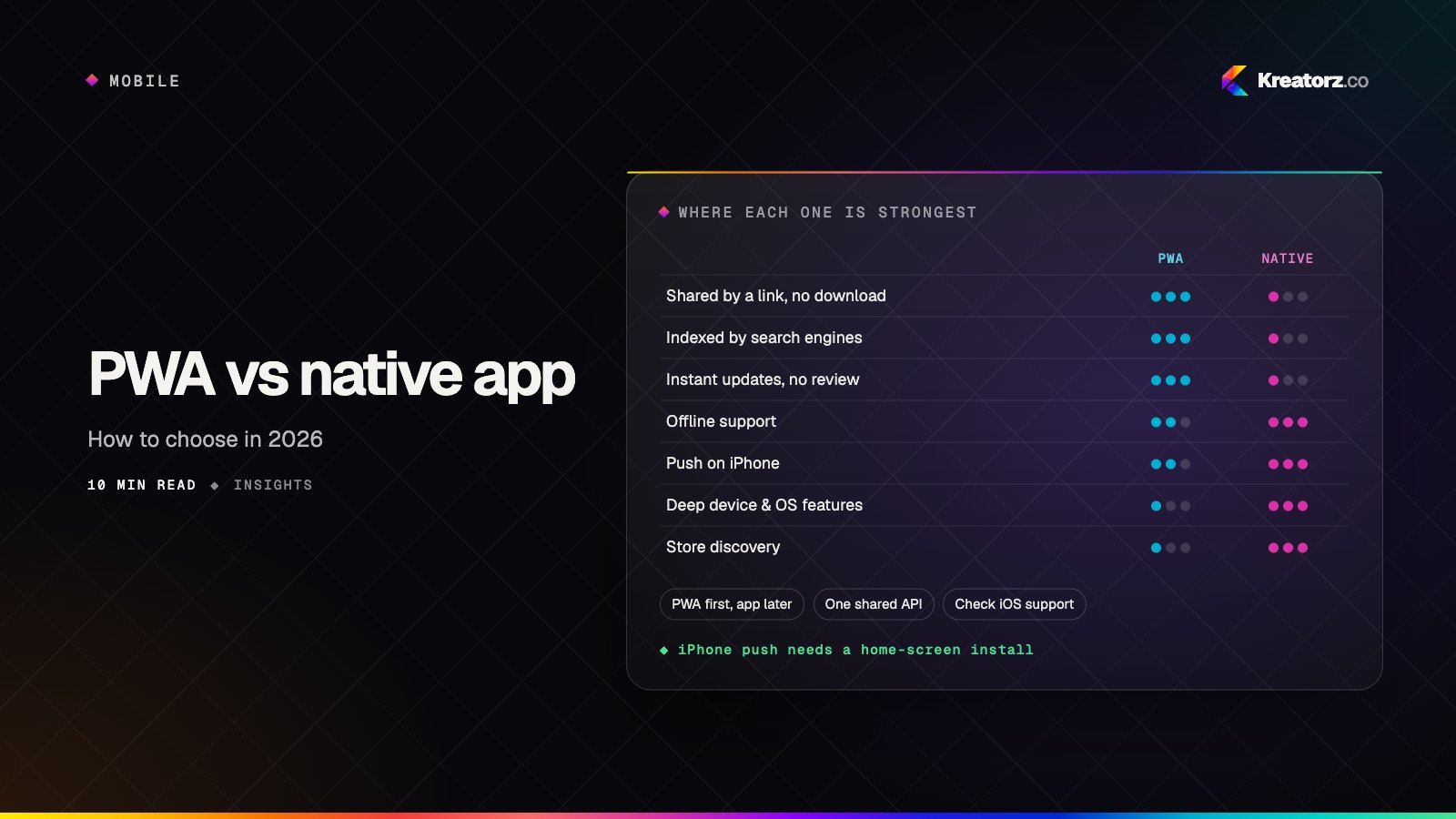
PWA vs native app in 2026: how to choose
Progressive web apps can now install, work offline and send push notifications on both iPhone and Android. Native apps still win on device access and store presence. Here is how the two really compare on capability, cost, distribution, SEO and offline, and how to decide which one your product needs, or whether you need both.
17 November 2026